Studio
01 / 06Staging · In development

Luckee

An AI analyst that does Amazon research before your competitors even know where to look.

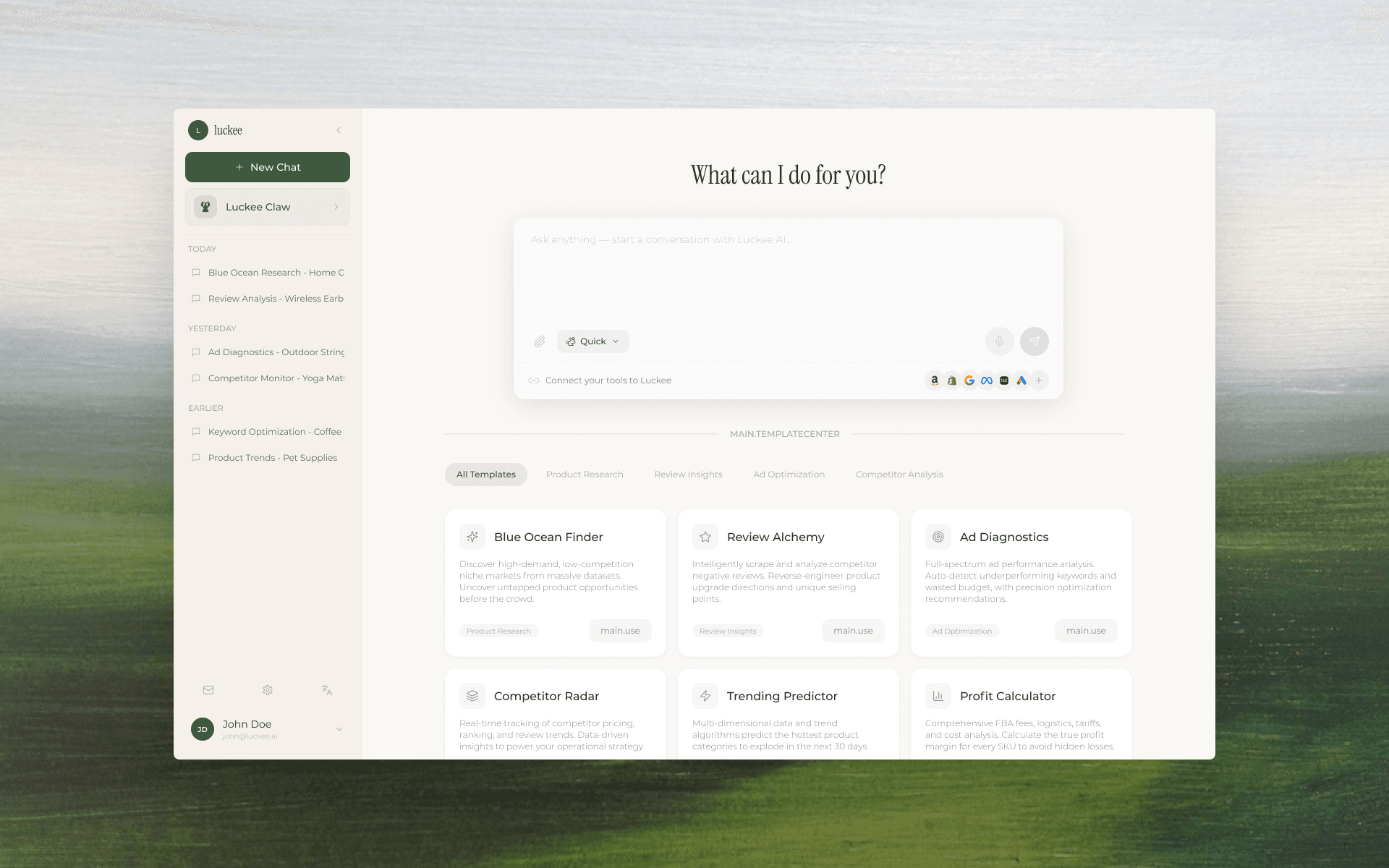
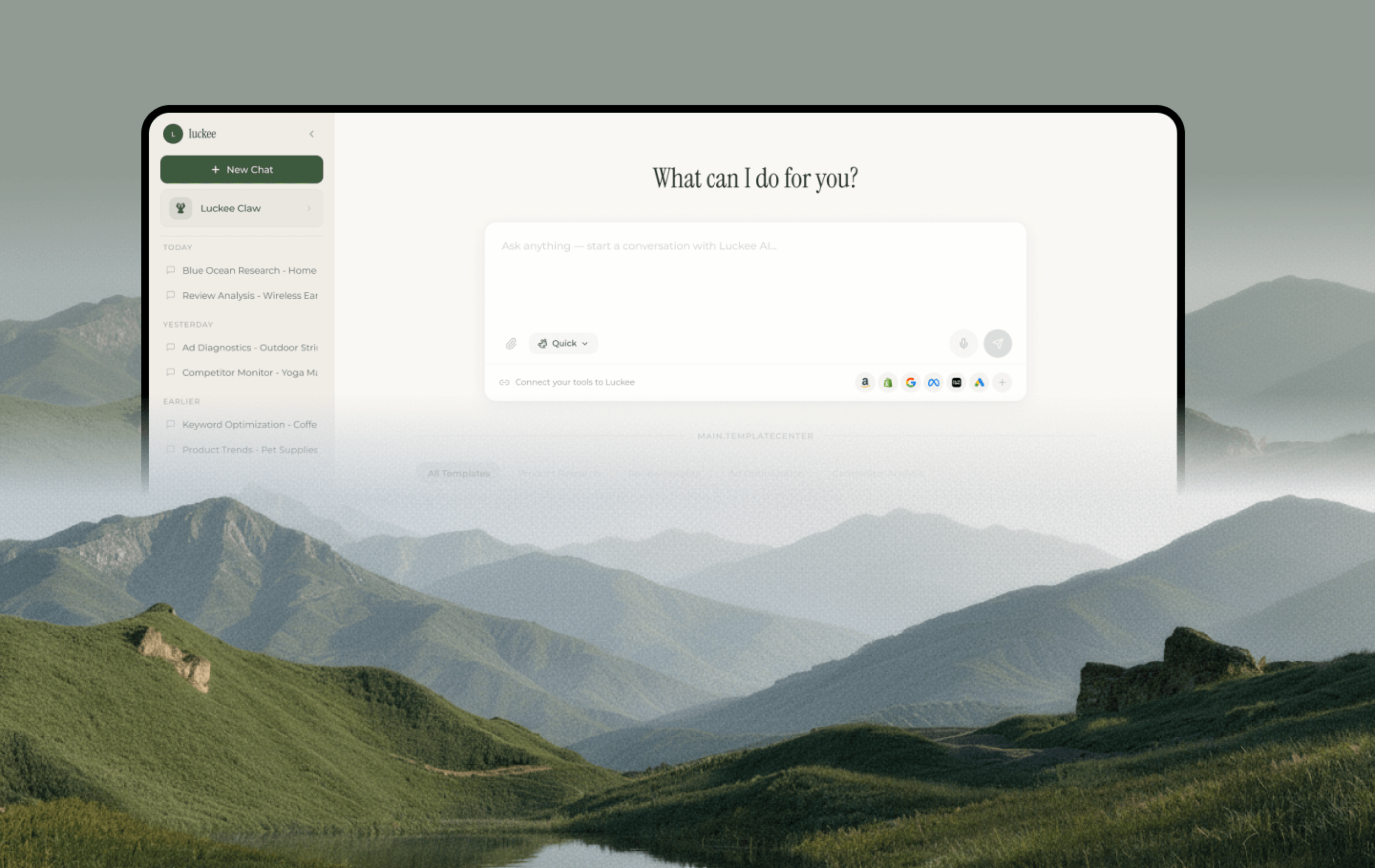
Luckee — AI e-commerce assistant home screen with chat input and template grid
Role
Solo Designer (Freelance)
Timeline
Apr 2026 · ~2 weeks · Figma Make
Scope
Brand · AI Chat UI · Template System · Report Generator
Year
2026
AI SaaSE-commerce Intel0→1 ProductFigma Make

Case at a glance

What it is, what was wrong, and what shipped — before the screenshots.

What this is

The project

Luckee is an AI SaaS tool for Amazon sellers — a chat-driven analyst that covers blue-ocean niche discovery, review analysis, ad diagnostics, competitor tracking, trend forecasting, and profit calculation. I designed the full product end-to-end as a freelance engagement, delivering in two weeks via Figma Make.

What was broken

The problem

Cross-border sellers make decisions across fragmented tools — keyword spreadsheets, ad dashboards, review scrapers, pricing calculators. The research step alone burns hours before anyone asks the real question: "should I enter this market?"

What I did

The action

I designed one conversational surface that handles six research workflows through prompt templates, generates structured downloadable reports, and keeps a persistent sidebar of past sessions — all in a cohesive editorial palette (sage + cream + serif) that positions Luckee as a premium tool, not a chatbot wrapper.

Outcomes & evidence

  • 0→1

    Full product design delivered in ~2 weeks

    Freelance engagement; product now in staging.

  • 6

    AI template workflows designed (research → report)

    Blue Ocean · Review · Ad · Competitor · Trend · Profit

  • Figma Make

    End-to-end delivery tool — design + interaction in one

    No handoff gap; interactive prototype = design spec.

Narrative — 01

Background

Luckee is an AI-powered research platform for Amazon sellers. The client wanted a single product surface where sellers can ask natural-language questions — "find me blue-ocean niches with monthly volume above 5K and growth above 15%" — and get back structured, actionable reports instead of raw data dumps.

I took this on as a freelance project and owned the entire design scope: brand direction, the conversational UI, the template system, the report layout, and the platform shell (sidebar navigation, settings, account). All delivered via Figma Make in roughly two weeks.

Narrative — 02

Problem

The cross-border seller's research stack is fragmented and manual:

1. 【Six tools for six jobs.】 Keyword research, review scraping, ad analytics, competitor monitoring, trend tracking, profit calculation — each lives in a separate SaaS tab with its own learning curve and pricing. Sellers context-switch constantly.

2. 【AI is invisible or unreliable.】 Some tools bolted on a chatbot, but the output was unstructured text — not the tables, rankings, and downloadable reports sellers actually need to make procurement decisions.

3. 【No memory, no continuity.】 Every research session starts from zero. There's no "pick up where I left off" — yesterday's blue-ocean scan can't feed today's competitor monitor without manual re-entry.

Evidence

Screens, flows, and brand artifacts — the visual proof behind the narrative above.

01 — Home & templates

One input, six workflows

The home screen gives sellers a single chat input and a grid of pre-built prompt templates — Blue Ocean Finder, Review Alchemy, Ad Diagnostics, Competitor Radar, Trending Predictor, Profit Calculator. Each template opens a detail card with a pain-point framing, a demo video link, and a one-click 'Fill into Input' action.

Luckee home — chat input, Luckee Claw assistant, and six template cards
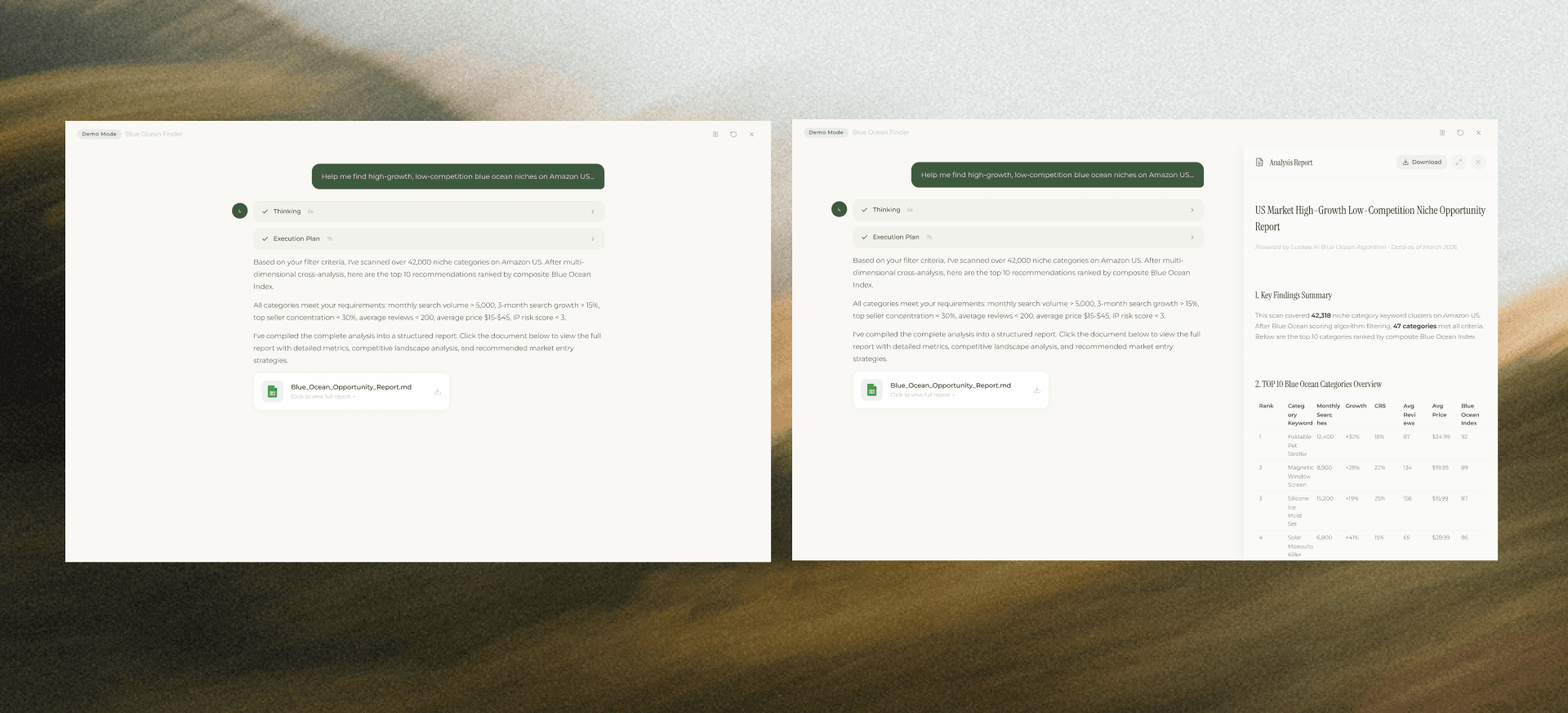
Blue Ocean Finder template detail — pain point, demo video, prompt example with Fill into Input

02 — Chat & execution

From question to structured answer

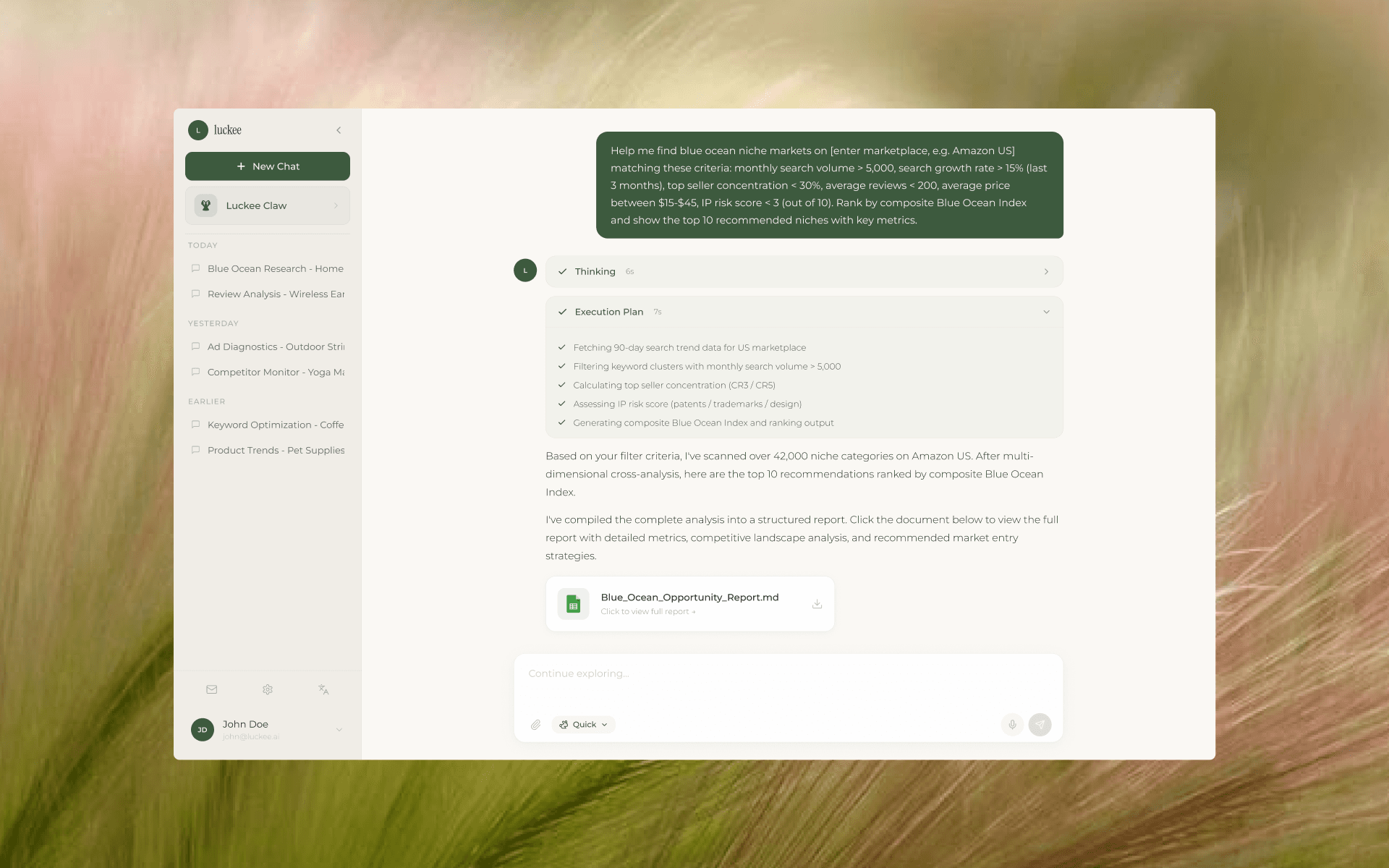
The seller sends a parameterized prompt; Luckee shows a Thinking step, then an Execution Plan with real-time progress (fetching trends → filtering keywords → calculating CRS → assessing IP risk → generating index). The final response includes a narrative summary and a downloadable report document.

Luckee chat — Execution Plan with checkmarks, narrative summary, and downloadable Blue_Ocean_Opportunity_Report.md

03 — Report system

Data that reads like a brief, not a spreadsheet

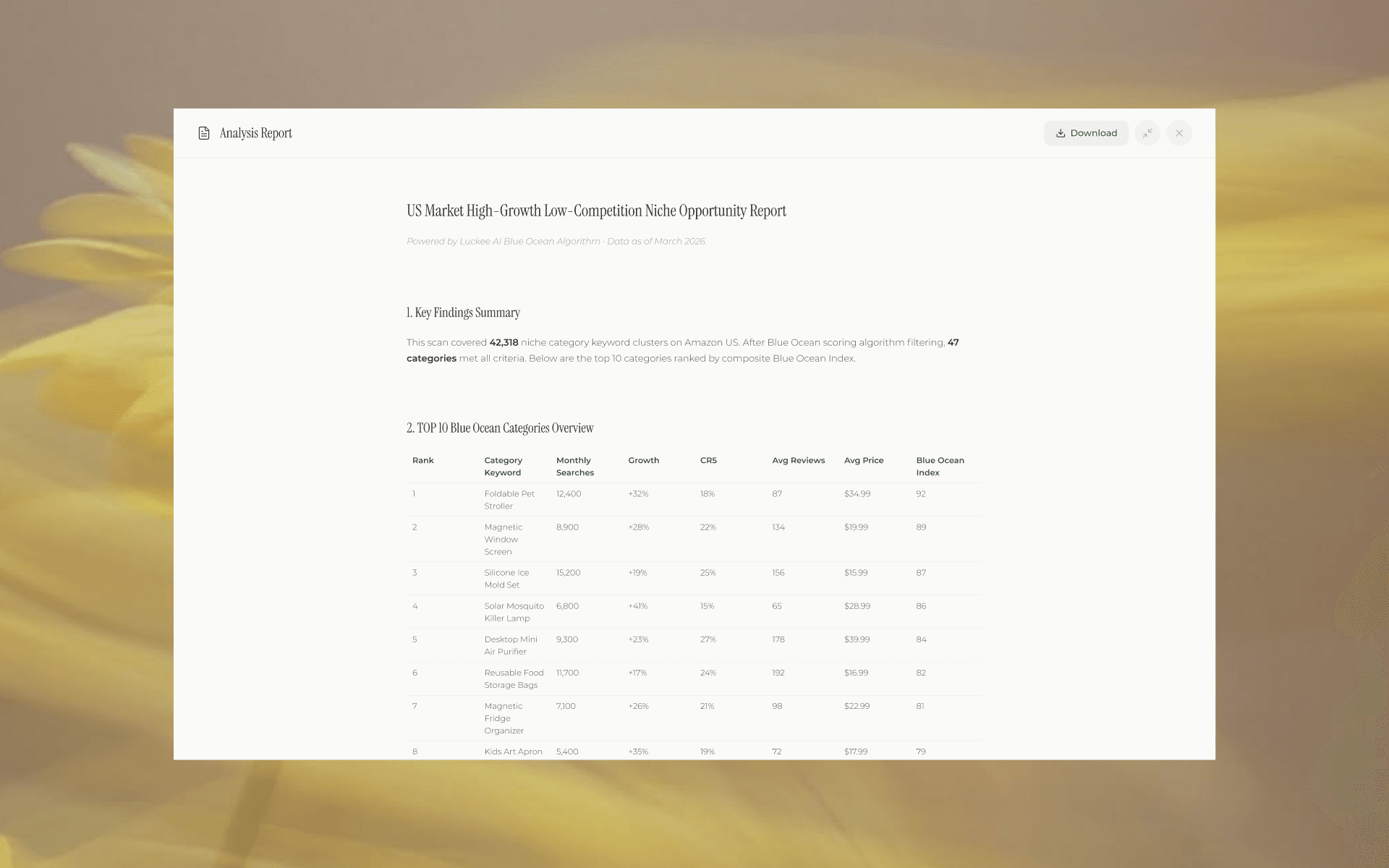
The generated report opens in a full-screen reader view: Key Findings Summary at the top, then a ranked table (Rank · Category Keyword · Monthly Searches · Growth · CRS · Avg Reviews · Avg Price · Blue Ocean Index). Download as a single document. The layout treats data as editorial content — serif headings, generous white space, no toolbar noise.

Blue Ocean Opportunity Report — Key Findings Summary + TOP 10 ranked table with Blue Ocean Index

Action

Key design moves

How strategy turned into interface and systems — the forks that actually changed the product.
  1. 01

    Templates as onboarding, not shortcuts

    Most AI tools bury prompt templates in a sidebar or a "try this" tooltip. I gave them the entire home screen. Each card frames a pain point ("Still blindly chasing hot categories?"), shows a demo video, and offers a fill-to-input action. Templates do three jobs at once: they teach the seller what Luckee can do, they reduce blank-page anxiety, and they standardise the prompt structure so the report output stays consistent.

  2. 02

    Show the machine thinking, not just the answer

    When Luckee scans 42,000 keyword clusters, the user needs to trust the process, not just the result. I designed a two-stage execution view: a collapsed "Thinking" indicator, then an "Execution Plan" with real-time checkmarks — fetching data, filtering, calculating concentration, assessing IP risk, generating the index. This transparency pattern converts wait time into confidence: the user watches their answer being built step by step.

  3. 03

    Reports as editorial objects, not data exports

    The conventional approach is "generate a CSV and let the seller sort it." I went the opposite way: a full-screen reader view with a Key Findings Summary at the top, followed by a ranked table with a composite Blue Ocean Index. Serif headings, generous white space, no toolbar noise. The report reads like a research brief you'd hand to a procurement lead — not a spreadsheet you'd dread opening. This elevates the perceived value of every interaction.

Results

What changed — and how design earned it.

01

User & business outcome

Luckee collapses six fragmented seller tools into one conversational surface. A research workflow that used to require bouncing between tabs, exporting CSVs, and manually cross-referencing — now starts with a question and ends with a downloadable brief.

02

How design delivered

A template-driven home that doubles as onboarding, a transparent execution view that builds trust during computation, and a report layout that treats data as editorial content. Together they position Luckee as a premium intelligence tool — not another chatbot with an Amazon API.

03

Leverage for the team

  • 01

    Delivered the full design system (brand palette, chat UI, template cards, report layout, platform shell) in two weeks — ready for front-end implementation.

  • 02

    Established a reusable template-card pattern that scales to any number of future AI workflows without redesigning the shell.

  • 03

    Set visual parity with the client's aspiration brands (premium SaaS tone) from day one, avoiding a 'chatbot prototype' first impression.

Narrative — Reflection

What this project leaves me with.

The most useful thing about this project was the constraint. Two weeks, Figma Make only, one designer. That forced me to design primitives — template card, execution step, report block — before ever thinking about "features." Once those three bricks existed, every new workflow (Review Alchemy, Competitor Radar, etc.) assembled itself.

The other thing I'd note: designing an AI tool for experienced sellers is different from designing for students or analysts. These users don't need onboarding copy — they need the interface to prove, in the first 10 seconds, that it already understands their vocabulary ("CRS", "Blue Ocean Index", "IP risk score"). The templates do that job: they speak the seller's language before the seller types a word.

If I had more time, I'd push the report system further — interactive charts, comparison mode across multiple scans, and an "export to Notion" integration. The current version is a clean read; the next version should be a working document.

Next project 03 / 06

HD

A 0→1 course platform that teaches independent teachers how to teach online — in one wizard.

Continue